If you are looking for a resume.io alternative, it is almost certainly because of the moment after you finished your resume: the download button led to a checkout. Resume.io, like most well-known builders, is free to use and paid to export, typically through a low-priced short trial that renews as a subscription unless you cancel. That model is legal, disclosed at checkout, and the reason so many people search for alternatives at 11pm with a finished resume they cannot save. Below is an honest look at what resume.io does well, and seven alternatives compared on the only question that matters at that moment: what does it cost to get the PDF, and is the file any good.
What resume.io does well
Credit where it is due. The editor is fast and pleasant, the templates are clean and current, the built-in phrase suggestions help people who freeze at a blank bullet, and the exported PDFs are well made. Many of its templates are single-column and parse cleanly. If you are happy to pay for a month or two while job hunting, it is a reasonable product. The frustration is not the quality; it is discovering the price at the end rather than the beginning, and the renewal that follows if you forget to cancel.
The question to ask any builder before you type a word
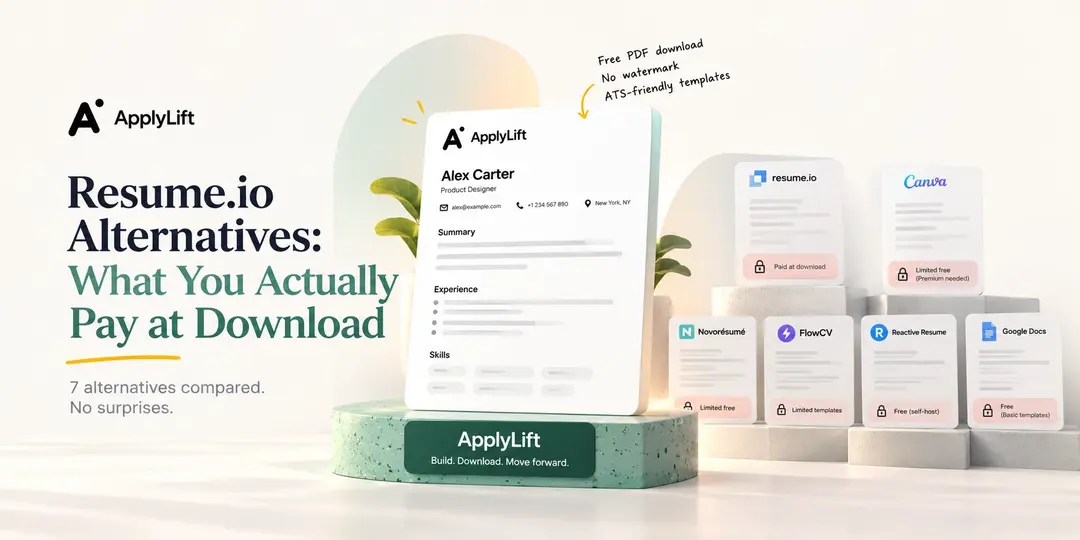
Can I download my finished resume as a PDF, without a watermark, without entering a card? Find the answer on the pricing page first. Builders fall into four groups:
Free download, no watermark. You pay for optional extras, or nothing. This is the group to prefer for a one-off resume.
Free download with a watermark or a locked template set. Usable if you accept the branding or the limited designs.
Paid at download via trial. A small charge for a few days that renews at a much higher monthly rate. Cancel on day one if you use it.
Straight subscription. Clear, at least. Fine for a long search, expensive for one document.
Prices and trial terms change often, so check the current checkout page rather than trusting any article, including this one.
Seven resume.io alternatives, compared
1. ApplyLift
The builder is free, including the PDF download, all templates and cloud sync; there is no watermark and no card at download. Templates are built to parse cleanly and export as text-based PDFs, and every template can be previewed with real example content on the CV templates pages. What costs money is optional AI: tailoring a CV to a job posting, generating a matching cover letter and running an AI gap analysis, metered in credits on the Pro and Max plans. Free accounts get a few credits to try it. Honest limitation: the free plan stores up to ten resumes and ten cover letters, which is plenty for a job search and not enough for a career coach.
2. Google Docs templates
Completely free, no account beyond Google's, and you own the file forever. The trade-off is design and structure: the built-in templates are dated, and several use tables for layout, which parse poorly. If you go this route, read which Google Docs resume templates are ATS-friendly before you pick one, and export to PDF rather than sharing a Docs link.
3. FlowCV
A genuinely free builder with unlimited PDF downloads and no watermark, funded by optional paid extras. Templates are clean and mostly single column. The editor is less guided than resume.io's, so you write your own bullets, which many people prefer. A strong choice if you want free and simple.
4. Reactive Resume
Open source and free, with the option to self-host. Very customisable, good PDF output, active development. The interface assumes a little comfort with settings and sections; it rewards people who like control and frustrates people who want a wizard.
5. Canva
Free tier with many resume designs, and excellent if you are in a design-led field where the document is a portfolio piece. The risk is the reason it looks good: heavy graphics, columns, icons and text boxes that parsers scramble. Fine to send directly to a person; risky through an application portal. Test any Canva export with a parser before relying on it.
6. Novorésumé and Kickresume
Both offer real free tiers with limited templates and features, and paid plans for the rest. Both produce polished PDFs and have good content guidance. Check exactly which templates and features are in the free tier, since the limits are where the cost hides, and both are transparent about it once you look.
7. Microsoft Word templates
If you already have Word, its templates are free, and a .docx is the second most parser-friendly format after a text-based PDF. Design quality varies; some are table-based like the Google ones. Simple, reliable, unglamorous.
A checklist for the free-to-download claim
Is "free" on the pricing page attached to the download, or only to the editor?
Is there a watermark on the free export? Look for a sample.
Does the free tier include the template you actually want?
If there is a trial, what is the renewal price and how do you cancel? Set a reminder before you pay.
Is the exported PDF text based? Run it through the free ATS resume test to see what a parser extracts.
Can you export your data or copy your text out? You will want it in two years.
Which alternative for which person
One resume, tonight, no card: ApplyLift, FlowCV or Google Docs.
Actively job hunting and tailoring to many postings: a builder with tailoring help, which is where ApplyLift's paid AI or a resume.io subscription earn their fee.
Design or creative role, sending directly to people: Canva, with a parser-safe backup for portals.
Developer who wants control: Reactive Resume.
Frequently asked questions
Is resume.io free?
The editor is free to use. Downloading is paid, generally through a short trial that renews as a subscription unless cancelled. Check the current terms at checkout.
How do I download my resume.io resume for free?
You generally cannot download the PDF without paying. You can copy your text out of the editor and paste it into a free builder such as ApplyLift or a Google Doc, then rebuild the layout there.
Which resume builder is completely free with no watermark?
ApplyLift, FlowCV and Reactive Resume all export PDFs without a watermark on their free tiers at the time of writing. Verify on their pricing pages, since tiers change.
Are free resume builders ATS-friendly?
Some are, some are not; it depends on the template, not the price. Single-column templates exported as text-based PDFs parse well. Test the file, whatever you paid.
Is it worth paying for a resume builder?
For a single resume, rarely. For an active search where you tailor for many roles and want writing help, a month of a good tool can be worth it. Pay for the help, not for the download button.
Try the free one first
Build your resume in the ApplyLift builder, download the PDF, and run it through the ATS test. If you never need the AI, you never pay. If you do, you will know exactly what you are paying for before you click.