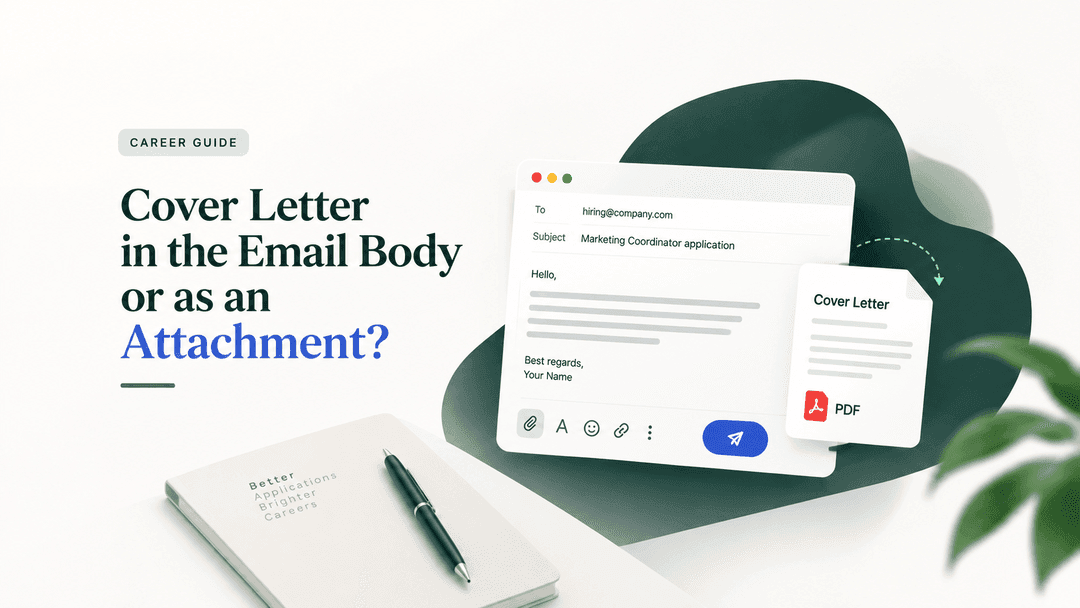
If the job posting tells you how to send your cover letter, do exactly that. If it does not, the safest choice is a short note in the email body plus the full cover letter attached as a PDF. The note gets read on a phone in the inbox preview; the PDF keeps its formatting when the recruiter forwards it to the hiring manager. Never paste the whole letter and attach the same letter too.
The rule in ten seconds
Posting says "paste your cover letter in the email" → body only. Resume attached.
Posting says "attach your cover letter" → attach the PDF, write two lines in the body.
Posting says nothing, you are emailing a person → short note in the body plus the PDF attached.
Applying through a portal with a cover letter upload field → PDF in that field. No email involved.
Portal has one upload slot only → resume first, cover letter as page two of the same PDF, or skip the letter if the posting calls it optional.
Portal has a plain text box → paste plain text, no bold or bullets, blank lines between paragraphs.
Why the hybrid wins when there are no instructions
The two readers of your application want different things. The recruiter doing the first pass is often on a phone between meetings. Text in the email body is visible without opening anything; an attachment is a tap, a download and a wait. If the body is empty, the first impression is a blank message with a file in it, which looks like every phishing attempt they have deleted that week.
The hiring manager, on the other hand, usually receives your application forwarded. Body text gets quoted, indented and stripped of line breaks as it travels through a reply chain. A PDF arrives exactly as you designed it, with your name at the top, on any device. For competitive or senior roles, where an application is likely to be passed around a panel, the attachment is the version that survives.
The hybrid gives each reader the version they need. It is also why the classic advice to "pick one, never both" is not actually in conflict with it. That advice targets a real mistake: pasting the full letter into the body and attaching the identical file, which makes the recruiter read the same thing twice. A three-sentence note pointing to an attached letter is not a duplicate. It is a cover note, and it is what a well-organised candidate sends.
What goes in the email body when the letter is attached
Keep it to three or four sentences and one short paragraph. Who you are, which role, one specific reason you are a strong fit, and what is attached. Plain text only: no bold, no bullet points, no coloured signatures, because mail clients render those unpredictably. A blank line between paragraphs. Your phone number and, if you have one, your LinkedIn URL under your name.
Copy-ready version:
Subject: Marketing Coordinator application, Nadia Rahman
Hello Ms. Okafor,
I am applying for the Marketing Coordinator role on your careers page. For the past two years I have run paid and organic social for a 40-store retail chain, and the campaign work described in the posting is close to what I do every week.
My resume and cover letter are attached as PDFs. I would be glad to talk through either.
Best regards,
Nadia Rahman
+1 555 010 2233 · linkedin.com/in/nadiarahman
What changes when the letter goes in the body
An email-body cover letter is a shorter document than the one-page attached version. Two hundred to three hundred words, three short paragraphs: why this company and role, one or two concrete achievements matched to the posting's top requirement, and a close that mentions the attached resume. Skip the letterhead, the date and the postal address block; they belong to paper, not to an inbox. The structure is otherwise the same as any strong letter, which our guide on how to write a cover letter walks through paragraph by paragraph.
File format and file name
PDF unless the posting asks for Word. PDF locks fonts, margins and page breaks on every device; a .docx can reflow and substitute fonts on the reader's machine. Name the file so it still makes sense in a folder of two hundred applications: Nadia-Rahman-Cover-Letter.pdf, or with the role added, Nadia-Rahman-Marketing-Coordinator-Cover-Letter.pdf. Never "coverletter_final_v3.pdf". Resume and cover letter stay separate files unless the portal only allows one upload.
The subject line
Your name and the role, in that order or reversed, short enough to survive an inbox preview: "Marketing Coordinator application, Nadia Rahman". If the posting specifies a subject line format or a reference number, use it character for character. Some employers filter their applications inbox on that string, and a creative subject line can send you into a folder nobody reads, the same way parsing problems can get a resume rejected before a human sees it.
Mistakes that quietly end applications
A blank body with attachments only. It reads as spam or as an unfinished send.
Pasting a letter with bold headings and bullets into the body. It arrives as a wall of stray asterisks and broken spacing in half of all mail clients.
Attaching a .pages, .odt or Google Docs link instead of a PDF.
Leaving "Dear Hiring Manager" in the body when the posting gave you a name.
Sending from an address that is not your name. Set one up; it takes a minute.
Not test-sending to yourself first. Open the attachment on your phone. If it looks wrong there, it looks wrong to the recruiter.
Frequently asked questions
Is it rude to attach a cover letter and also paste it in the email?
Pasting the full letter and attaching the same letter is redundant and slightly annoying to read. A short cover note in the body with the full letter attached is not the same thing, and it is the recommended approach when the posting gives no instructions.
Do I need a cover letter at all if I am emailing my resume?
If you are emailing a person directly, the email itself must do the cover letter's job, so write at least a proper short note. If the posting calls the letter optional and you have nothing specific to say, a strong three-sentence note beats a generic attached letter.
Should the resume and cover letter be one PDF or two?
Two files by email. One combined PDF only when a portal gives you a single upload slot, and then the resume comes first.
What if the recruiter contacted me on LinkedIn?
Reply in the same thread with the short cover note version, and attach the PDF resume and letter to the message if the platform allows it. Do not move the conversation to email unless they ask; recruiters track candidates where the conversation started.
PDF or Word for the attached cover letter?
PDF, unless the posting says Word. The only common reason to send .docx is an employer who states they will edit or annotate the file.
Write the letter once, send it right every time
ApplyLift's cover letter generator drafts a letter from your resume and the job posting, maps each requirement to your real experience, and exports a clean one-page PDF on the same letterhead as your resume. Paste the opening paragraph into the email body as your cover note, attach the PDF, and you have the hybrid in under a minute.