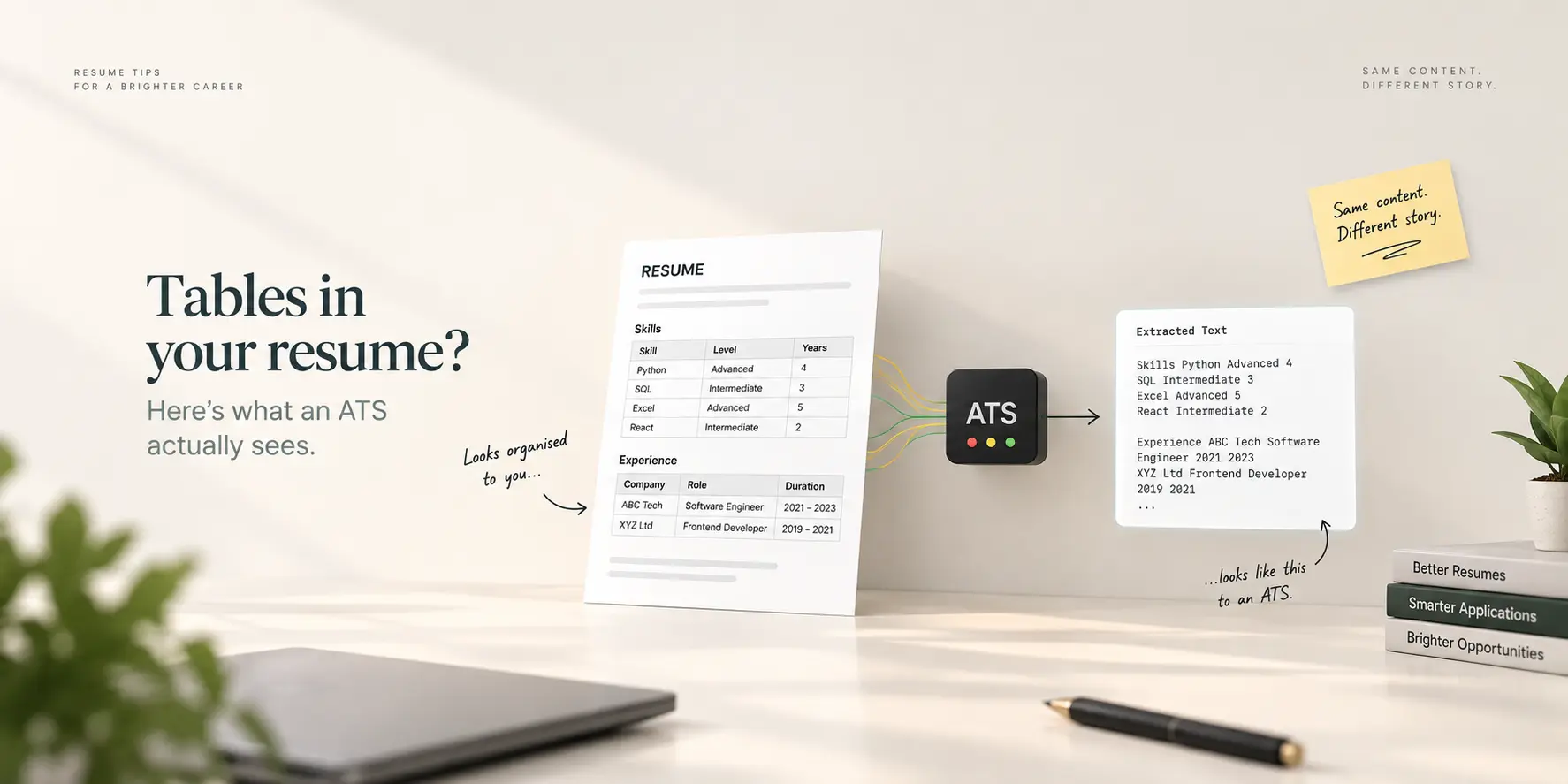
An applicant tracking system can usually extract the words inside a table in your resume (CV). What it often cannot keep is the structure: which cell was a label and which was a value, which column a skill sat in, and which row belonged to which job. The text survives; the meaning of its position does not. So a skills matrix laid out as a table can arrive in the system as one long line of skill names with no levels attached, and a two-column layout built with a table can be read in an order you did not intend. The safe rule is simple: use tables for nothing that a recruiter or a keyword search needs to understand.
How a parser reads your file
A parser does not look at your resume. It extracts the text layer of the PDF or Word file and then guesses where sections, jobs and dates begin and end, using rules and, increasingly, machine learning. Text is extracted in the order it is stored in the file, which for a PDF is the order the software wrote it, not necessarily the order you see it. In a plain single-column document the two orders match, and parsing is boring in the best way. Tables break the match in two ways:
Cell order. A table's text is often stored row by row, sometimes column by column, and the parser cannot tell which. A row that reads "Excel | Advanced | SQL | Intermediate" may be extracted as "Excel Advanced SQL Intermediate", which is fine, or as "Excel SQL Advanced Intermediate", which is not.
Lost labels. The relationship between a header cell ("Skill", "Level", "Years") and the cells below it is visual. Once extracted as text, the parser sees a list of words with no column headings attached. Your "5 years" is now a number floating near a skill it may or may not belong to.
Modern parsers in systems like Greenhouse, Lever and recent Workday releases handle simple tables better than the horror stories suggest. Older, OCR-based parsers, still common in large enterprises, handle them worse. You do not get to choose which one the employer bought.
Which tables are risky, and which are harmless
A table used as the page layout (two columns, sidebar plus main). The riskiest use. Contact details, skills and experience can interleave in the extracted text. If the parser reads across the page, your job title merges with a skill from the sidebar. Use a template that builds columns without a table, or go single column.
A skills matrix with levels or years. The skills survive as keywords, which is what searches use, but the levels detach. Harmless for matching, useless for the levels. If levels matter to you, write them inline: "Excel (advanced), SQL (intermediate)".
A header table holding name, phone and email in cells. Contact details usually extract fine, but a parser that also skips header regions can miss them entirely. Put contact information in the body, in plain lines.
A table of certifications or courses with dates. Dates may detach from their course names. A simple list with the date at the end of each line is safer and reads the same to a human.
Invisible tables (borders removed) used for alignment. Same risk as visible ones. The parser does not see borders; it sees the table structure in the file.
What "reading a table" looks like from the other side
When a recruiter opens your candidate record, they see fields: name, current title, employers, skills, education, dates. If your table parsed badly, those fields are half empty or contain fragments in the wrong place. The recruiter does not conclude "this person used a table". They conclude "this profile looks incomplete", or they never see you at all because the keyword search that should have returned you did not, since your skills were stored as one merged string. That is the real cost, and it is the same mechanism behind most rejections that happen before a human reads the resume.
See it yourself in one minute
Upload your PDF to the free ATS resume test. It extracts the text exactly the way a parser does and shows you the result page by page. Read the section where your table was. If the skills come out in the right groups and every date sits next to its job, you are fine. If you see a merged line of skill names, a level with no skill, or contact details scattered into the middle of your experience, the table is costing you. The tool is free and needs no account.
What to use instead of tables
For skills: a comma-separated line or a short bulleted list under a "Skills" heading. Group them with bold labels if you must: "Data: SQL, Python, Tableau."
For two-column designs: a template whose columns are real layout regions, not table cells. Our CV templates render columns this way and export as text-based PDFs, so the extracted order matches the visual order.
For dates and titles on one line: right-aligned tabs inside a single paragraph, which every parser reads as one line, rather than a two-cell table.
For a certifications list: "Google Data Analytics Professional Certificate, Coursera, Aug 2025" as one line per item.
If you built your resume in Google Docs, the same logic decides which Google Docs resume templates are ATS-friendly: the ones that use tables for layout are the ones to avoid.
Frequently asked questions
Will a table get my resume rejected?
Not automatically. Nothing about formatting triggers a rejection. A badly parsed table makes your profile incomplete and less searchable, which means fewer recruiters ever open it.
Are tables in Word better than tables in PDF?
Both store table structure that parsers may misread. A Word table exported to PDF keeps the same cell order problem. The format that matters is the layout, not the file type.
Can I use a table if it has no borders?
Borders are cosmetic. The parser sees the table either way. Removing borders only hides the problem from you.
Do modern ATS systems handle tables correctly?
Newer parsers do much better with simple tables than legacy ones. Since you cannot know which system an employer runs, single-column text for anything a search relies on is the only layout that is safe everywhere.
How do I keep a two-column look without a table?
Use a template built with layout regions rather than table cells, and check the extracted text order with the ATS resume test before applying.
Check the file before you send it
Run your current resume through the free ATS resume test. If the extracted text is clean, keep the design you love. If it is scrambled, rebuild the risky sections as plain text and test again. Two minutes now saves an application that would otherwise sit unread in an incomplete record.